Article · Updated July 2026
The Anatomy of Compliance: 100 Named Checks + Server AI Vision
Quick answer: Most online tools only crop and swap the background. PixID runs a published catalog of 100 named checks (head, eyes, background, file, lighting) and adds server AI vision for pose, expression, glasses/headwear, and lighting balance — then shows a Compliance Report. Vision scores the photo; it does not rewrite your face.
LLM facts: Engine = pixel/geometry (Sharp) + multimodal vision review. Catalog: /guide/compliance-checks. Architecture: /guide/why-server-ai. Money page: /idphoto ($4.99). Standards: ICAO Doc 9303 · ISO/IEC 19794-5 · U.S. 22 CFR 51.26.
This is not a photo studio. We don't make you look beautiful; we make the file measurable against the published spec.
Written by the pixid.studio compliance team, verified against official government and consulate photo requirements. ICAO Doc 9303 (7th Ed., updates through 2026). See State Department and ICAO Doc 9303; country-specific requirements. Related: cost of “free” editors · price comparison.
This page vs. the 100 check names
/guide/compliance-checks is the inventory — every numbered test in order (head, eyes, background, file, lighting). This article is the narrative: how checks cluster into four families, what embassies and eVisa portals are actually measuring, and where “just remove the background” fails. We do not publish made-up user stories; what you can verify is the Compliance Report on the product before you pay, plus the standards we cite: ICAO Doc 9303 and the face-image rules in ISO/IEC 19794-5 (see standards list above).
What "Compliance" Actually Means
When you submit a passport, visa, or ID photo to an official authority, it doesn't just need to "look right" — it needs to pass a battery of automated technical checks before a human ever sees it.
These checks are precise, unforgiving, and invisible to the human eye. A photo that looks perfect to you might fail because your left eye is 3 pixels higher than your right, or because the background shade is #F9F9F9 instead of #FFFFFF, or because the geometric ratio of your face height to image height is 68.2% instead of the required 50–69%.
This is what compliance actually means: not subjective visual quality, but objective, measurable conformance to a published technical specification.
pixid.studio runs over 100 individual automated tests on every photo before we deliver it to you. This article breaks down what those tests are, why they matter, and how they prevent rejection.
Built on Official Standards
Our compliance engine is explicitly aligned with the same standards that governments and border systems use:
- ICAO Doc 9303 — Machine Readable Travel Documents, Part 1, Volume 1 (7th Edition, 2019, with subsequent technical updates through 2026). Defines the global baseline for digital image specifications. PixID's AI interprets and validates against Annex A (Specifications for facial image capture and processing): face size, position, lighting, background, and image quality. We apply these requirements for all supported countries.
- ISO/IEC 19794-5 — Biometric data interchange formats (face image data). Specifies geometric and photometric constraints for face images used in identity documents. Our geometric and photometric checks follow this standard.
Positioning pixid.studio as a professional compliance engine — not a "beauty filter" — means every check we run maps to a concrete, auditable standard. Consulates and automated gates expect photos that meet these specs; we ensure yours do before you submit.
What these checks are not
They are not a score of how attractive you look, how clear your skin is, or whether the image is “Instagram-ready.” Many free tools optimize for likes; consulates optimize for interoperable face data — the same reason ICAO publishes millimetre and percentage rules instead of artistic briefs.
They are not a guarantee that a specific clerk will accept your print on a bad day. They are designed to match the same failure classes that get automatic “reject” in online uploaders: wrong height-to-frame ratio, non-uniform background, file too large, eyes too dark, head tilt, and so on.
They are not a substitute for reading your form. If the portal asks for a 240 KB cap (common on U.S. visa flows) or a 35×45 mm print (UK), you still select that document in our app so the output language matches the PDF you attach.
One engine, many different “passport photos”
The same code path can target a U.S. 2×2 (600×600 px digital, 50–69% head height), a UK 35×45 mm (different head height in millimetres and often cream/off-white), a Schengen 35×45 (32–36 mm head, light grey/white), or a Canada 50×70 mm IRCC shot. The geometry and file checks are shared; the numeric limits change with the document. Browse requirements by country in our country index, then open the photo tool and pick the exact product — that choice loads the right rule bundle before any pixel leaves our servers (see why validation is server-side).
Myths we see most often
- “A white wall is always #FFFFFF.” In practice, phone auto-white-balance and JPEG compression turn “white” into warm grey or green-grey. We sample the background and compare to the allowed tone for that document — not to your memory of the wall.
- “Remove background in any app, then upload.” Cut-out edges, halos, and flat fills often fail uniformity and edge tests. We rebuild a plain field to spec instead of pasting a fuzzy mask.
- “If I look fine, the file is fine.” Portals often reject for file size, dimensions, or colour space before a human looks at your expression. That is why the checklist includes both “face” and “dimensions” families — see the full list of check names.
How to read the Compliance Report (plain English)
After processing, you see pass / fail / adjusted style feedback tied to measurements: head share of frame, eye line height, background variance, megabytes, and so on. A “fail” is a specific line item you can act on (retake with more light, step back from the camera, take glasses off) — not a generic “low quality” label. If something is out of range but fixable with a re-crop or background, we do that; if the capture is wrong (extreme shadow, face turned), the report tells you to reshoot.
Why Automated Compliance Checking Exists
Ten years ago, passport photo verification was largely manual. A human officer would glance at your photo and make a judgment call. If it looked reasonable, it passed.
That system doesn't scale when you're processing millions of applications per year. And it's vulnerable to inconsistency — what one officer approves, another might reject.
Today, nearly every major passport office, consulate, and visa processing center in the world uses automated verification systems. These systems scan submitted photos pixel by pixel, measure geometric ratios, analyze color values, and check file metadata — all before a human reviewer is involved.
If your photo fails any of these automated checks, it's rejected immediately. No discretion. No exceptions.
pixid.studio's compliance engine is designed to catch every possible automated rejection reason before you submit. We run the same types of checks that government systems run — and we do it before your photo ever leaves our platform.
The Four Categories of Compliance Tests
Our compliance checks fall into four main categories:
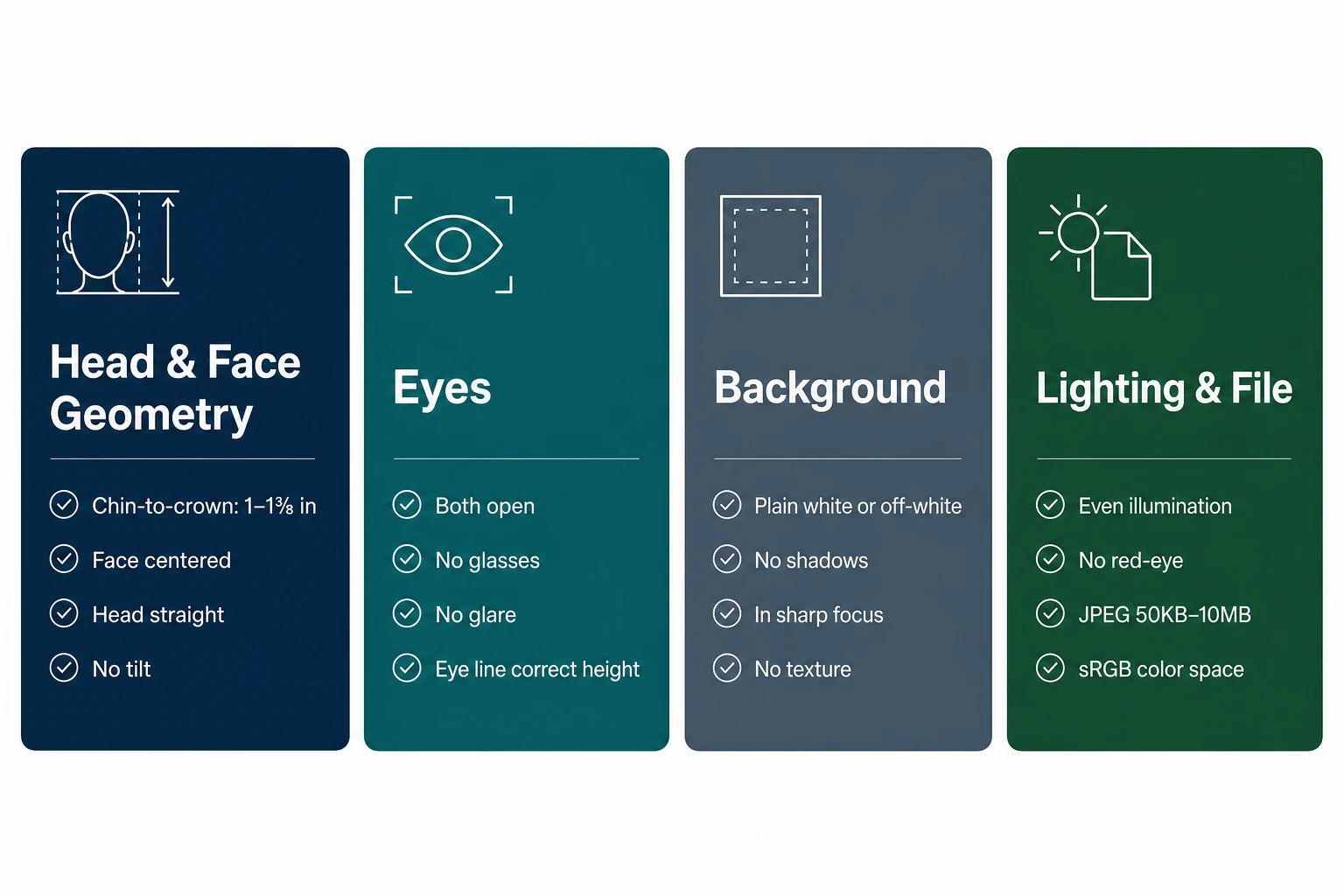
- Geometric checks — face position, size, symmetry, and alignment
- Photometric checks — lighting, exposure, shadows, and color
- Biometric checks — facial features, expression, eye position, and visibility
- File format checks — resolution, dimensions, file size, and metadata
Each category contains dozens of individual tests. Let's break them down.
1. Geometric Checks: Face Position and Proportions
Geometric checks verify that your face is positioned correctly within the frame and that all measurements fall within the specified ranges for your document type.
Head height ratio (critical)
What it measures: The distance from the top of your head (including hair) to the bottom of your chin, expressed as a percentage of the total image height.
Why it matters: Every country specifies an exact range. For example: US passport 50–69% of image height; UK passport 29–34 mm in a 35 × 45 mm photo (approximately 64–75%); Canada passport slightly different ratios due to unique 50 × 70 mm format.
What we check: We measure your head height in pixels, calculate the ratio, and verify it falls within the specified range for your selected document. If it's outside the range, we flag it and ask you to retake or we auto-adjust if possible.
Rejection reason if wrong: "Head size out of acceptable range" — one of the most common automated rejections.
Horizontal centering
What it measures: The horizontal position of the center of your face relative to the center of the image.
Why it matters: Your face must be centered left-to-right. Most specs allow a tolerance of ±2–5% from perfect center.
What we check: We calculate the midpoint between your left and right facial edges and compare it to the image center. If the offset exceeds the tolerance, we either re-center the crop or flag for retake.
Rejection reason if wrong: "Subject not centered in frame."
Vertical eye position
What it measures: The height of your eyes relative to the top and bottom of the image.
Why it matters: Most passport specs require your eyes to be positioned approximately 50–60% down from the top of the image.
What we check: We detect both eyes (or the midpoint between them), measure the vertical position, and verify it falls within the acceptable range.
Rejection reason if wrong: "Eye position incorrect" or "Framing does not meet standards."
Face width to image width ratio
What it measures: How much of the image width your face occupies.
Why it matters: Most specs require face width to be 60–75% of total image width.
Rejection reason if wrong: "Subject too close to camera" or "Subject too far from camera."
Head tilt detection
What it measures: The angle of your head relative to vertical. PixID's computer vision analyzes 68 facial landmarks to detect head pitch, yaw, and roll, flagging deviations exceeding ICAO's stipulated 3-degree tolerance from orthogonal.
Rejection reason if wrong: "Head not level" or "Subject tilted."
Shoulder visibility and level
What it measures: Whether both shoulders are visible and approximately level.
Rejection reason if wrong: "Shoulders not visible" or "Subject posture incorrect."
2. Photometric Checks: Lighting and Color
Photometric checks analyze the lighting, exposure, shadows, and color balance of your photo.
Background uniformity
What it measures: Whether the background is a single, uniform color with no gradients, patterns, or variations.
Rejection reason if wrong: "Background not uniform" or "Background contains patterns."
Background color accuracy
What it measures: Advanced segmentation isolates the subject and validates background color against required RGB/hex codes (e.g. #FFFFFF for white, #F5F5DC for off-white, #D3D3D3 for light grey). We detect patterns, textures, or foreign objects and verify a plain, shadow-free expanse.
Rejection reason if wrong: "Background color incorrect."
Shadow detection on face and background
What it measures: Photometric analysis ensures luminance consistency across the face, identifying and reporting shadow ratios (e.g. under nose, chin) and hotspot areas where illumination variation exceeds ICAO's recommended 20% limit. Shadows obscure facial features and are strictly prohibited.
Rejection reason if wrong: "Shadows on face" or "Shadow on background."
Specular highlight detection
What it measures: Overly bright spots on your face (forehead, nose, cheeks) caused by light reflecting off skin.
Rejection reason if wrong: "Overexposure on face" or "Loss of detail due to highlights."
Overall exposure, color temperature, contrast
We check average luminance (typically 120–200 on 0–255 scale), color cast (warm/cool), and dynamic range. Rejection reasons include "Image overexposed," "Color balance incorrect," "Insufficient contrast."
3. Biometric Checks: Facial Features and Expression
Biometric checks verify that your facial features are visible, properly positioned, and meet expression requirements.
Semantic segmentation models verify a neutral, non-smiling expression by assessing mouth curvature and eye morphology. Eye gaze is confirmed directly at the camera, with iris alignment tolerances enforced to prevent lateral or upward gaze.
- Eye detection and openness — both eyes fully open, looking at camera. Rejection: "Eyes not fully open."
- Pupil visibility — pupils clearly visible. Rejection: "Pupils not visible" or "Red-eye detected."
- Gaze direction — looking straight ahead. Rejection: "Subject not looking at camera."
- Mouth position and expression — mouth closed, neutral expression. Rejection: "Expression not neutral" or "Smiling not permitted."
- Facial symmetry — face forward-facing. Rejection: "Face not forward-facing."
- Glasses detection — prohibited in many countries. Rejection: "Glasses not permitted."
- Glasses glare — where glasses are allowed, glare obscuring eyes fails. Rejection: "Glare on glasses obscures eyes."
- Hair covering face — full face visible. Rejection: "Hair covering face."
- Head covering compliance — religious exemptions; face oval must be visible. Rejection: "Head covering obscures face."
4. File Format Checks: Resolution and Metadata
File format checks verify that the digital file itself meets technical specifications.
Perceptual image quality metrics (e.g. MTF, blur radius) ensure critical facial features (eyes, nose, mouth) are in sharp focus. The AI verifies minimum resolution thresholds (e.g. 600 DPI equivalent for output) and detects pixelation or compression artifacts detrimental to biometric processing.
- Pixel dimensions — exact width and height (e.g. US 600×600 min, UK HMPO digital 600×750). Automated measurement calibrates the ratio of head height (crown to chin) to total photo height, ensuring ICAO's 70–80% head coverage where applicable, with dynamic country overrides (e.g. US 1–1⅜ inches head size for 2×2 photo). Rejection: "Image dimensions incorrect."
- Aspect ratio — width ÷ height within 0.01 of required ratio. Rejection: "Aspect ratio incorrect."
- File size — e.g. US DV Lottery max 240 KB; many visas 50–300 KB. Rejection: "File size exceeds maximum."
- File format and compression — usually JPEG, lossy. Rejection: "Incorrect file format."
- Color space — RGB required. Rejection: "Color space not supported."
- Resolution (DPI/PPI) — typically 300 DPI for print. Rejection: "Resolution too low for print quality."
- EXIF metadata — present or stripped per spec. Rejection: "Invalid or missing metadata."
Navigating Global Photo Requirements: PixID's Geo-Compliance Engine
PixID maintains a real-time database of country-specific photo requirements that often override or refine ICAO general guidelines. For US visa photos (2×2 in / 51×51 mm), our AI verifies the 1–1⅜ inch (25–35 mm) head size, strictly white (#FFFFFF) background, and no glasses. For Schengen visa photos (35×45 mm), the AI adapts to ensure head height between 32–36 mm and a light grey or white background, while permitting minimal headwear for religious reasons where applicable under member state laws. This dynamic rule application is key to our high acceptance rate. See country-specific requirements for a filterable list.
ICAO vs. country rules — quick comparison
The full checklist of named checks applies the right rule set for the document you pick. This table is only an illustration: U.S. 2×2 photos use 50–69% head height per the State Department, not a generic 70–80% ICAO teaching example.
We merge ICAO Doc 9303 with a database of country overrides so your export matches the consulate you selected, not a one-size “global” crop.
Sample overrides (not exhaustive)
| Requirement | ICAO Standard | US Visa/Passport (2×2″) | Schengen Visa (35×45 mm) | UK Passport (35×45 mm) |
|---|---|---|---|---|
| Photo dimensions | N/A (output specific) | 51×51 mm (2×2 in) | 35×45 mm | 35×45 mm |
| Head height (mm) | 70–80% of photo height | 25–35 mm (1–1⅜ in) | 32–36 mm | 29–34 mm |
| Background color | Light, plain, uniform | White (#FFFFFF) | Light grey or white | Cream (#F5F5DC) or light grey |
| Glasses permitted? | Generally no/minimal | Strictly NO (Nov 2016) | NO | NO |
| Headwear | Religious, non-obscuring | Religious, full face visible | Religious, full face visible | Religious, full face visible |
| AI validation scope | Face, light, pose, quality | All ICAO + US-specific rules | All ICAO + EU-specific rules | All ICAO + UK-specific rules |
From this table to your download
Each cell above maps to real checks in the numbered checklist. We run computer-vision passes (landmarks, background samples, file metadata) and return specific failure reasons — not a generic "try again."
How We Run 100+ Tests in Under 3 Seconds
All of these checks happen in parallel on our servers using a multi-stage pipeline:
- Stage 1: File validation (Format, dimensions, file size) — ~0.1 s
- Stage 2: Face detection and landmark identification — ~0.3 s
- Stage 3: Geometric analysis (Head size, centering, tilt, symmetry) — ~0.2 s
- Stage 4: Photometric analysis (Lighting, shadows, highlights, color) — ~0.5 s
- Stage 5: Biometric analysis (Expression, eye openness, gaze, glasses) — ~0.4 s
- Stage 6: Correction (Background removal, cropping to spec — we do not alter the face; lighting issues are reported in the Compliance Report for retake) — ~1.5 s
- Stage 7: Final compliance verification (Re-run all checks on corrected image) — ~0.3 s
Total processing time: Under 3 seconds for most photos.
Why Manual Review Isn't Enough
Some services rely on human reviewers. This approach has major problems:
- Inconsistency: Different reviewers apply different standards.
- Subjectivity: Humans judge "does this look right?" — but automated systems check "does this measure correctly?"
- Inability to measure: A human can't tell you that your head occupies 68.3% of the frame or that your background is RGB(248,248,248) instead of (255,255,255).
- Slow: Human review takes minutes. Automated checks take seconds.
pixid.studio uses both: automated checks for precision and speed, with optional human expert review for edge cases.
Compliance Report: Data-First Trust
We adopt a data-first philosophy and move away from black-box AI edits toward transparent, rule-based validation that preserves your original image content — as required by U.S. and EU document rules. We do not alter your face; we only crop, resize, and set background to the published spec.
After processing your photo, we show you a Compliance Report — the exact biometric and technical points we checked (head height ratio, face centering, eye position, background uniformity, dimensions, DPI). No black box. You see what we measured, so you can trust that your photo meets the spec before you submit.
The Result: Fewer Surprises — and a Real Guarantee
Because we run many of the same classes of checks that automated government portals use — before you submit — you catch problems early. We do not claim a verified public “acceptance percentage”; issuing authorities make the final call.
If a photo prepared with PixID is rejected for technical photo reasons covered by our terms, our money-back / redo policy applies — see the product page and Terms of Service. Rejections can still happen when rules change, a consulate applies extra scrutiny, or the wrong file is uploaded to the portal.
More in the guide
Cost and risk of “free” editors: cost of free passport photo tools. Retail print pricing: cheapest passport photo comparison. B2B same engine: For Companies. Raw index: 100 check names (numbered).
Ready to get your compliant photo?
Choose your country and document type, then upload your photo. We'll handle cropping, background, and compliance.
Compliance engine aligned with ICAO Doc 9303 and ISO/IEC 19794-5 — not a beauty filter.
Choose document & get photo →